
A trusted service offering instant, affordable game recharges, enhancing every player’s gaming experience.
A trusted service offering instant, affordable game recharges, enhancing every player’s gaming experience.



Note: We guarantee the security of our customers' information.
What is CDK?
CDK stands for "Redemption Code", which is a method to redeem items, virtual currency, or other rewards by entering a specific code.
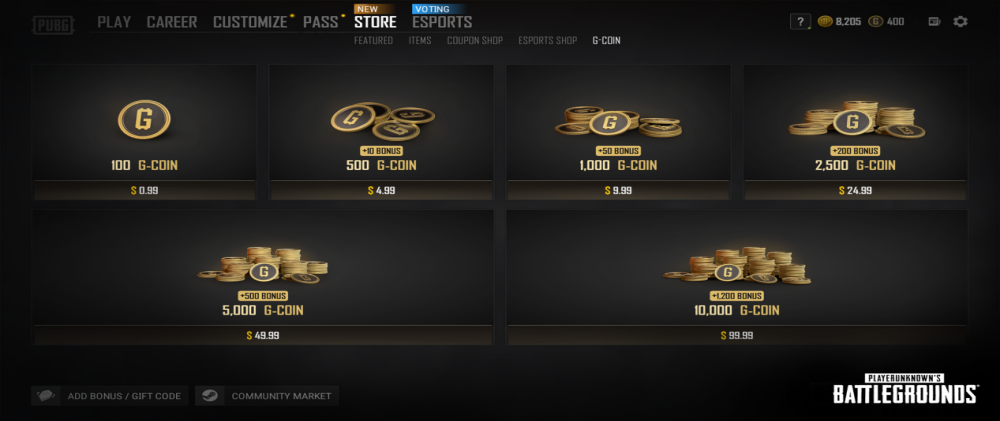
PUBG Gcoin CDK is a redemption code containing specific characters. After entering the code, you can get a certain amount of Gcoin for purchasing in-game items.
How to redeem G coin CDK?
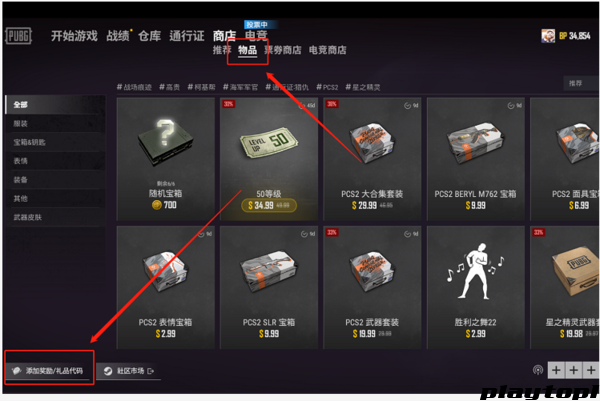
1. Go to the store page and click Items
2. Click Add Reward/Gift Code in the bottom-left corner
3. Enter the CDK we sent you to complete redemption
As a global game top-up and item trading platform, Playtop1 provides secure transactions and broad game coverage for players worldwide. We cooperate with many major game companies and support over 100 applications, such as PUBG, Valorant, and Marvel Rivals.
We guarantee you will receive the following services on Playtop1 :
- Secure transactions: Playtop1 supports multiple payment methods, including PayPal, Visa, and MasterCard, making Rainbow Six Mobile top-up simple and flexible. All Rainbow Six Mobile top-up transactions are protected by bank-level encryption and advanced anti-fraud systems to ensure platinum top-ups are always safe and reliable.
- Instant delivery: Top up Rainbow Six Mobile on Playtop1 and quickly receive your rewards with instant delivery - no waiting! Buy platinum fast and improve your Rainbow Six Mobile experience as soon as possible!
- Exclusive offers: Choose Playtop1, and you will get exclusive promotions, bonuses, and limited-time deals while topping up Rainbow Six Mobile.
- 24/7 Customer Support: Our professional support team is available around the clock to help with any questions or concerns and ensure a smooth top-up experience. If you have any questions about Rainbow Six Mobile top-ups, please feel free to contact our support team.
1. Visit the Playtop1 official website https://playtop1.com, choose your preferred language and currency, then log in to your account.
2. On the homepage, click Game Top-Up & Recharge> Rainbow Six Mobile.
3. Select the Rainbow Six Mobile package and the amount of Platinum you want to purchase, then click "Top Up Now".
4. Choose your preferred payment method, then click "Pay Now" to complete the transaction.
5. Enter your game login information, including login method, account, and password, to ensure the top-up is credited successfully.



Post a comment