迅速でお得なゲームチャージを提供する信頼のサービスで、すべてのプレイヤーのゲーム体験をより快適にします。


img
img
img

商品詳細

  • GameMax

Brawl Stars

高速 安全
4.81
4.99
(236件以上販売)
主な特徴
  • Applicable Servers: International Servers
  • Recharge method: Log in and recharge
  • Applicable Platform: Mobile Games
SKU :
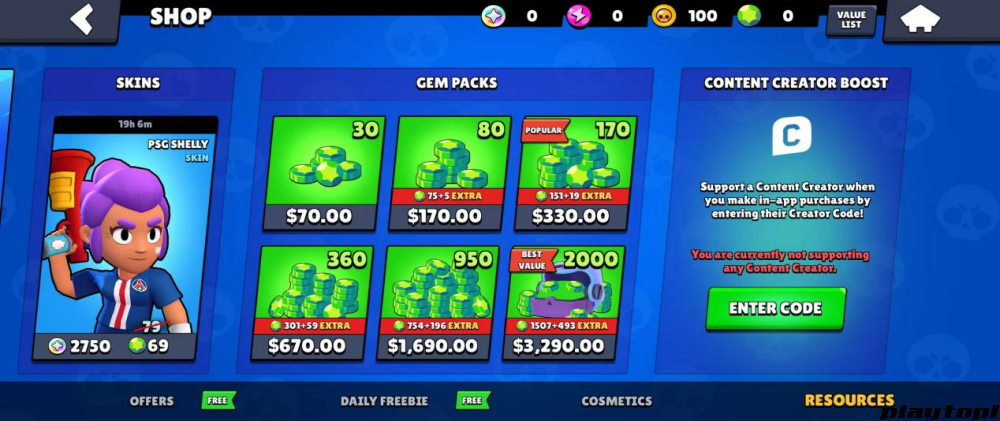
  • 80 Gems $ 4.81
  • 170 Gems $ 9.63
  • 360 Gems $ 19.27
  • 950 Gems $ 48.17
  • 2000 Gems $ 95.49
  • Brawl Pass $ 8.32
  • Brawl Pass Plus $ 12.01
  • PRO PASS $ 23.24

支払い方法

今すぐ購入
重要なお知らせ
  • チャージ処理中はゲームにログインしないでください。
  • ゲームアカウント、パスワード、認証コードの入力が必要な場合があります。
  • ゲームによってはゲームIDのみで購入できる場合があります。

注: お客様の情報は安全に管理されます。

Brawl Stars Gem Top-Up Required Information

Log in to your game account via [Self-Service Top-Up], then redeem the package you purchased on the platform in-game.

Note: Top-up is supported only when logging in with Supercell ID 

Brawl Stars Gem Top-Up Rewards

If this is your first Brawl Stars gem top-up, you will receive extra in-game top-up rewards. Please refer to in-game top-up rules for details.

Brawl Stars Top-Up Result

After top-up is successful, you can check the result in-game.


Top-up Required Information


1.After placing an order, you need to provide your linked Supercell ID+password. If two-factor verification is required, please cooperate with verification login.

2.After placing an order, please contact our staff via whats app at the bottom right corner.

3.Do not log in during the top-up process to ensure the transaction proceeds normally. If login is needed, please negotiate with the seller.

Top-Up Process

1. Select the package you need.


2. After placing an order, send your Supercell ID+password to our staff.
Notes:


1. Due to currency differences, package prices shown in Playtop1 in-game are in USD. If your purchase currency is not USD, switch to USD to check the corresponding USD amount of the product. You can purchase any package with equivalent value.

2. Due to regional game pricing and account-specific pricing, if your package price has discounts or premiums, purchase may fail. Please contact our customer service after a failed purchase.


Note: Apple account top-up is currently not supported. If needed, please bind Supercell ID first, then log in with your Supercell ID account for top-up.

How to bind Supercell ID

1. Open the game

Launch Brawl Stars and enter the main screen.

2. Enter the settings menu

Tap the "≡ three lines" button / settings icon in the top-right corner, then find Settings.

3. Find the Supercell ID option

At the bottom of the settings page, you will see the "Supercell ID" button (if it shows Disconnected / not connected, your account is not bound yet).

4. Start the binding process

Tap Supercell ID → Register Now (if you already have a Supercell ID, choose Log In).

Enter a valid email address in the email field (this is important for future login and account recovery).

Tap Continue.

5. Verify email & complete registration

Supercell will send a 6-digit verification code to your email.

Open your inbox and check the verification code (remember to check spam).

After entering the code, tap Submit, and binding is complete!

Tip: Supercell ID and Google Play / Apple Game Center are different login systems; binding your ID keeps your account safer.

Why choose Playtop1 for Brawl Stars gem top-up?

Playtop1 is a global, professional, and secure game trading platform that provides top-up services for popular games such as Genshin Impact and PUBG.

Our advanced encryption technology ensures every transaction is secure. After top-up, you can usually receive gems within 3 minutes, so you can return to the game immediately.

We provide affordable top-up services for global players. On Playtop1 , buying gems can save you up to 25% in cost. Don’t miss the chance to buy Brawl Stars gems at a low price on Playtop1!

評価分布
5つ星
0%
4つ星
0%
3つ星
0%
2つ星
0%
1つ星
0%
ユーザーレビュー

レビューを投稿

評価
レビュー内容
画像をアップロード (任意、最大3枚)
JPG、PNG、GIF形式に対応しています。各画像は2MB以下にしてください。
img

最新のおすすめ情報や
`r`n お得なご案内を受け取りましょう